측정하면, AI 어시스트가
무엇을 고칠지 알려줍니다Measure, and AI assist
tells you what to fix
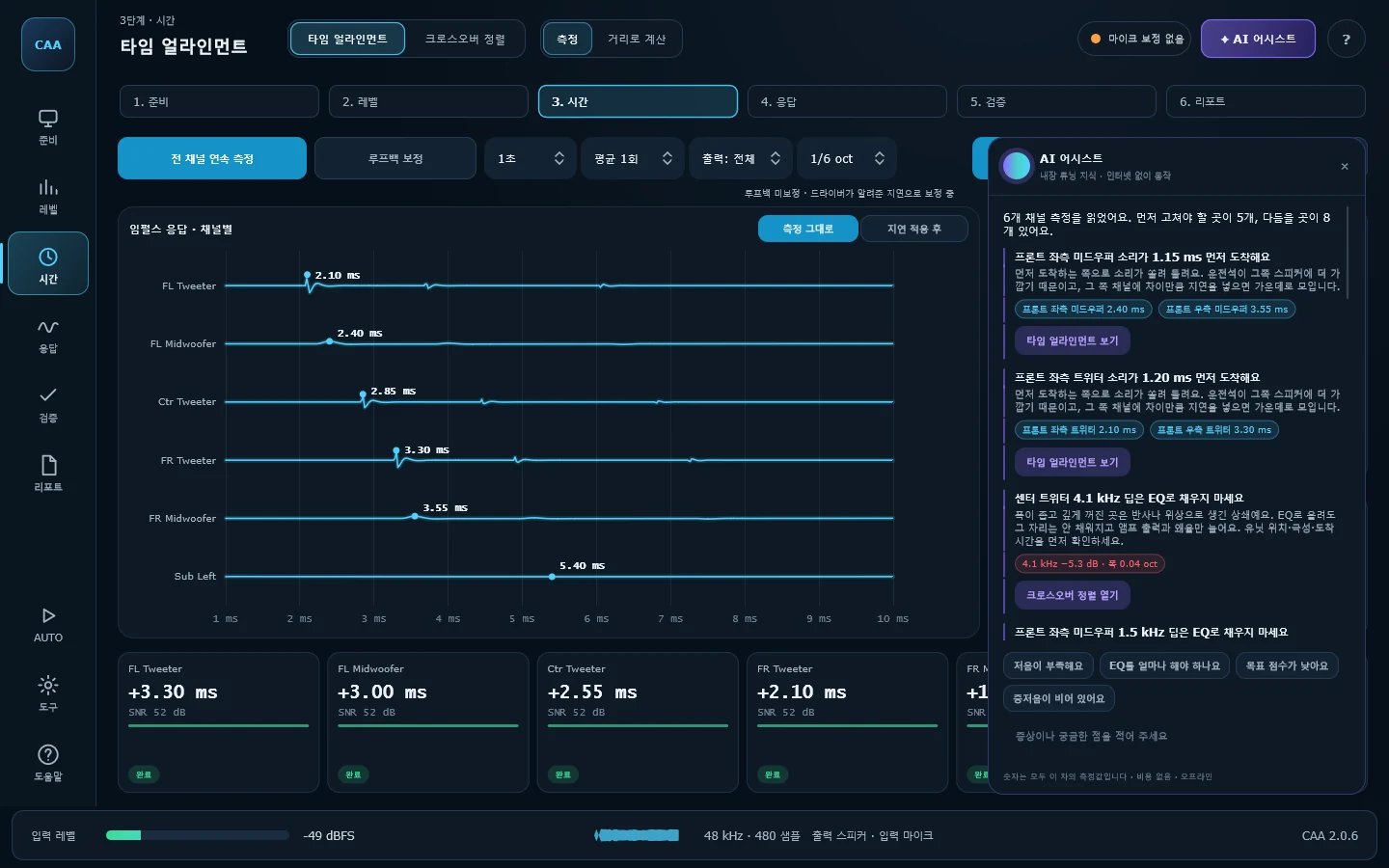
도달 시간, 레벨, 응답을 읽고 증상과 고칠 순서를 짚어 줍니다 — "프론트 좌측 트위터가 1.20 ms 먼저 도착해요", "이 딥은 EQ로 채우지 마세요". 내장된 튜닝 규칙으로 판단하므로 모든 숫자는 이 차의 측정값에서 나오고, 인터넷 없이 PC 안에서 동작합니다. 측정 엔진은 검증 241항목을 전부 통과합니다.It reads arrival times, levels and the response, and names the problem and the order to fix it in — "the front-left tweeter arrives 1.20 ms early", "don't fill this dip with EQ". It works from built-in tuning rules, so every number comes from this car's measurements, and it runs on the PC with no internet. The engine passes all 241 verification checks.
2.0에서 달라진 것What changed in 2.0
기능을 더 넣기보다, 측정한 값이 실제로 차에 들어갈 때까지 틀어지지 않게 하는 데 썼습니다.Less about adding features than about making sure a measured value is still right by the time it reaches the car.
무료, 시리얼 없음Free, no serial
평가 기간도 기능 제한도 없습니다. 예전 버전에서 쓰던 세션 파일도 그대로 열립니다.No trial, nothing locked. Sessions from earlier versions open as they are.
여섯 단계 작업 흐름Six-stage workflow
29개 화면을 19개 메뉴, 여섯 단계로 묶었습니다. 지금 어디쯤인지 왼쪽 레일과 단계 막대가 항상 보여줍니다.29 screens grouped into 19 menus and six stages. The rail and the stage bar always show where you are.
EQ 추천 = 실제 적용값EQ advice = what is applied
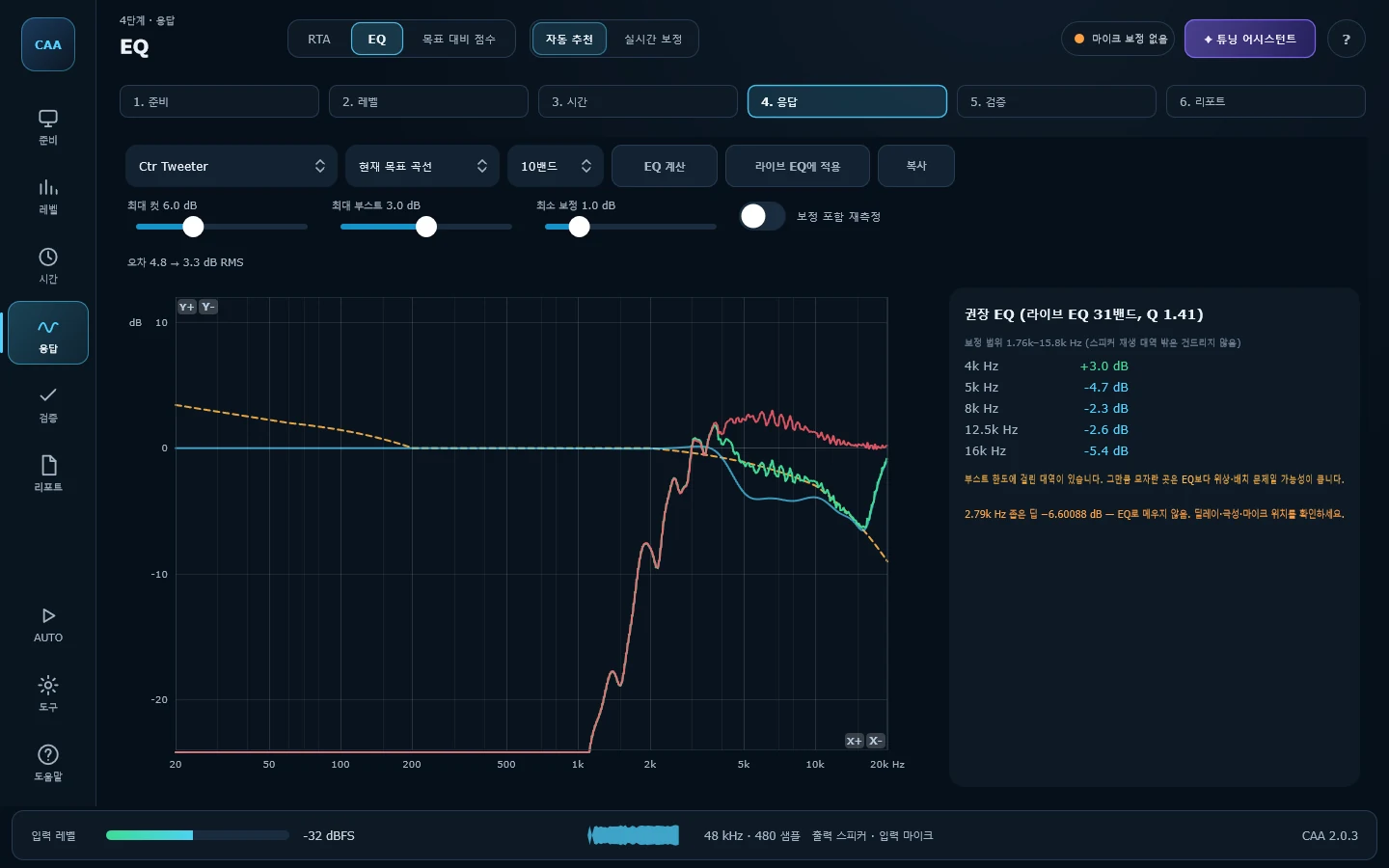
추천을 라이브 EQ의 31밴드 필터 그대로 계산합니다. 화면에 보이는 곡선과 실제로 걸리는 보정이 같고, 부스트는 +3 dB에서 멈춥니다.Advice is computed with Live EQ's own 31 filters, so the curve shown is the correction applied. Boost stops at +3 dB.
전/후 비교Before and after
채널마다 첫 측정을 '보정 전'으로 보관합니다. 다시 재면 목표와의 차이가 몇 dB 줄었는지, 지연이 어떻게 바뀌었는지 나란히 나옵니다.Each channel's first take is kept as "before". Measure again and the error against target, and the delay, sit side by side.
AI 어시스트AI assist
측정 데이터를 읽고 증상과 고칠 순서를 알려줍니다. 크로스오버가 없는 채널, 소음이 큰 측정, 목표에서 벗어난 대역을 짚어 해당 화면으로 바로 보냅니다.Reads the measurements and says what is wrong and in what order to fix it, with a button straight to the screen that fixes it.
숫자는 키보드로Numbers from the keyboard
31밴드를 클릭하고 숫자를 치면 바로 들어가고, Enter로 다음 밴드로 넘어갑니다. 줄자로 잰 거리, 114 dB 교정기 값도 칸에 그대로 입력합니다.Click a band, type, Enter for the next one. Tape-measure distances and a 114 dB calibrator go straight into their fields.
CAA의 특징What sets it apart
범용 음향 측정 도구를 차에 가져다 쓰면, 필요 없는 기능은 넘치고 정작 필요한 것은 직접 계산해야 합니다. 이건 처음부터 차 안에서 쓰려고 만든 것입니다.Bring a general-purpose analyser into a car and you get plenty you do not need, while the things you do need you work out by hand. This was built for the inside of a car from the start.
차량 채널 구조 그대로Built around car channels
트위터·미드·미드우퍼·우퍼·서브를 좌우/전후·센터까지 19채널로 관리합니다. 설치된 스피커만 켜두면 크로스오버, 레벨 매칭, 타임 얼라인먼트, 라이브 EQ의 채널 목록이 전부 그 구성을 따릅니다.Tweeter, midrange, midwoofer, woofer and subs across front, rear and centre — 19 channels. Enable the drivers you actually have and the channel lists in crossover, level match, time alignment and Live EQ all follow.
검증된 측정 방식Established measurement methods
새로 지어낸 방법은 하나도 없습니다. 로그 사인 스윕 디컨볼루션, 루프백 지연 보정, GCC-PHAT, 듀얼 FFT H1. 음향 측정에서 오래 쓰여 온 것들입니다. 그래서 다른 도구로 같은 파일을 다시 재서 대조할 수 있고, 실제로 그 표를 공개해 두었습니다.Nothing here is invented. Log-sine-sweep deconvolution, loopback latency calibration, GCC-PHAT, dual-FFT H1 — the methods have been around for decades. That is what makes the results checkable against another tool measuring the same files, and the comparison is published.
무료, 설치하면 끝Free, and it just runs
가입도 결제도, 시리얼도 없습니다. 작업 현장의 노트북은 대개 정리가 안 돼 있으니, 런타임을 따로 깔 필요가 없게 만들었습니다. 관리자 권한도 묻지 않습니다.No sign-up, no card, no serial. The laptop that lives in a workshop is rarely a tidy one, so there is no runtime to install first, and no administrator prompt on the way in.
여섯 단계, 앱에 보이는 그대로Six stages, as the app lays them out
순서에는 이유가 있습니다. 정렬을 맞추기 전에 EQ부터 만지면, 위상이 만든 딥을 주파수가 모자란 것으로 착각해 부스트를 버리게 됩니다.The order matters. Reach for EQ before the drivers are aligned and you will spend boost filling a hole that phase made, not frequency.
장치·채널·크로스오버·목표를 먼저 정합니다Device, channels, crossover and target first
- 사운드카드와 마이크, 보정 파일(UMIK-1 등)을 연결Interface, microphone and its calibration file (UMIK-1 and the like)
- 설치된 스피커만 켜면 모든 화면의 채널 목록이 그 구성을 따름Enable the drivers you have; every channel list follows
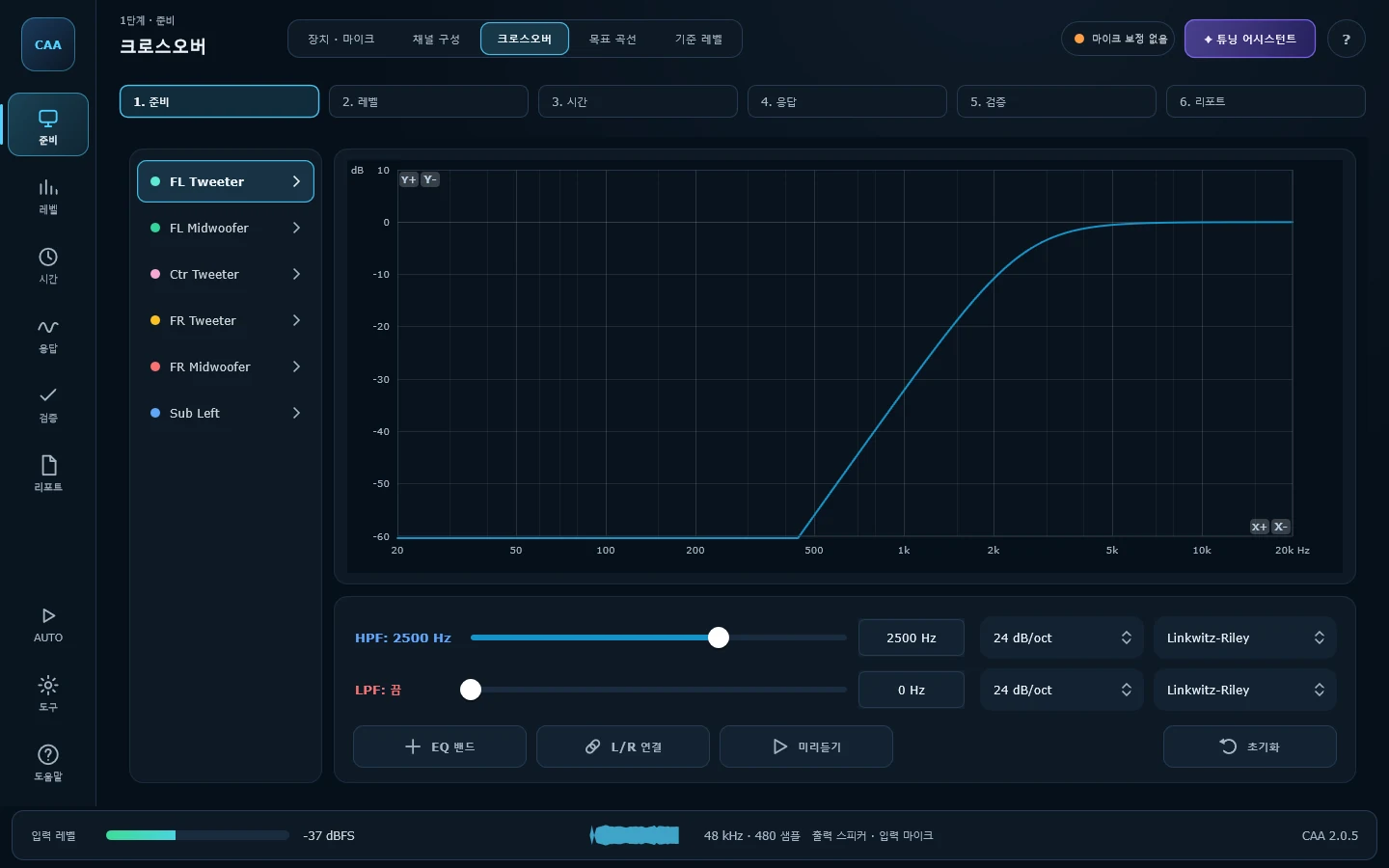
- 유닛마다 HPF/LPF와 슬로프를 정하고 세션에 함께 저장HPF/LPF and slope per driver, saved with the session
- Harman In-Car 등 10가지 목표 곡선Ten target curves, Harman In-Car among them
화면: 장치 · 마이크 / 채널 구성 / 크로스오버 / 목표 곡선 / 기준 레벨Stage 1 of 6 · Prepare
사용설명서에서 보기 →Read it in the manual →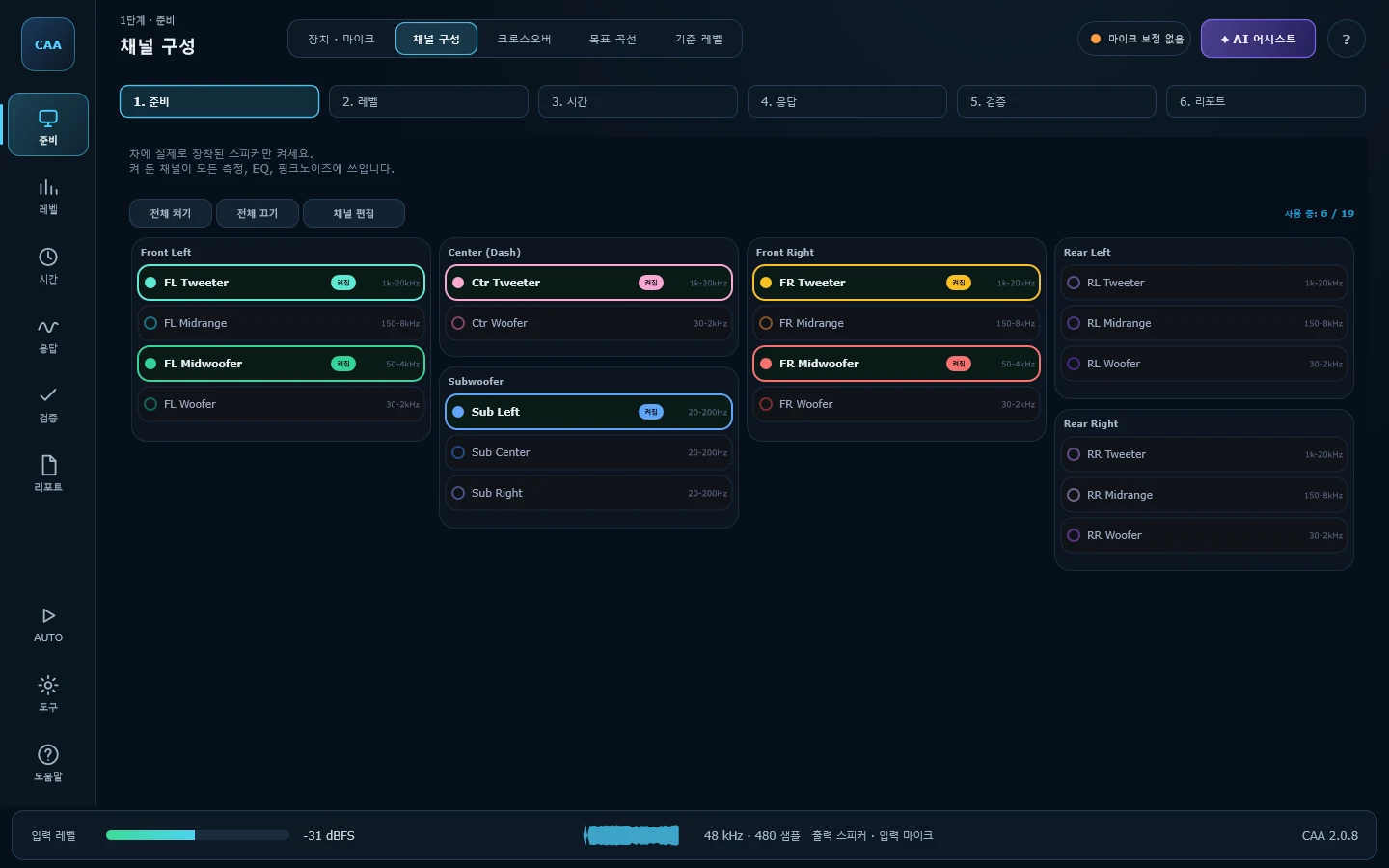
채널끼리, 좌우끼리 레벨을 맞춥니다Match channels, and left against right
- 채널별 레벨을 기준 채널에 맞춰 dB로 표시Every channel's level against a reference, in dB
- 좌우 비교와 운전석 기준 음상 측정Left against right, and the image from the driver's seat
- 대시보드 5지점으로 센터가 어디에 맺히는지 확인Five points across the dash show where the centre lands
화면: 레벨 매칭 / 좌우 비교 / 음상 · 센터Stage 2 of 6 · Level
사용설명서에서 보기 →Read it in the manual →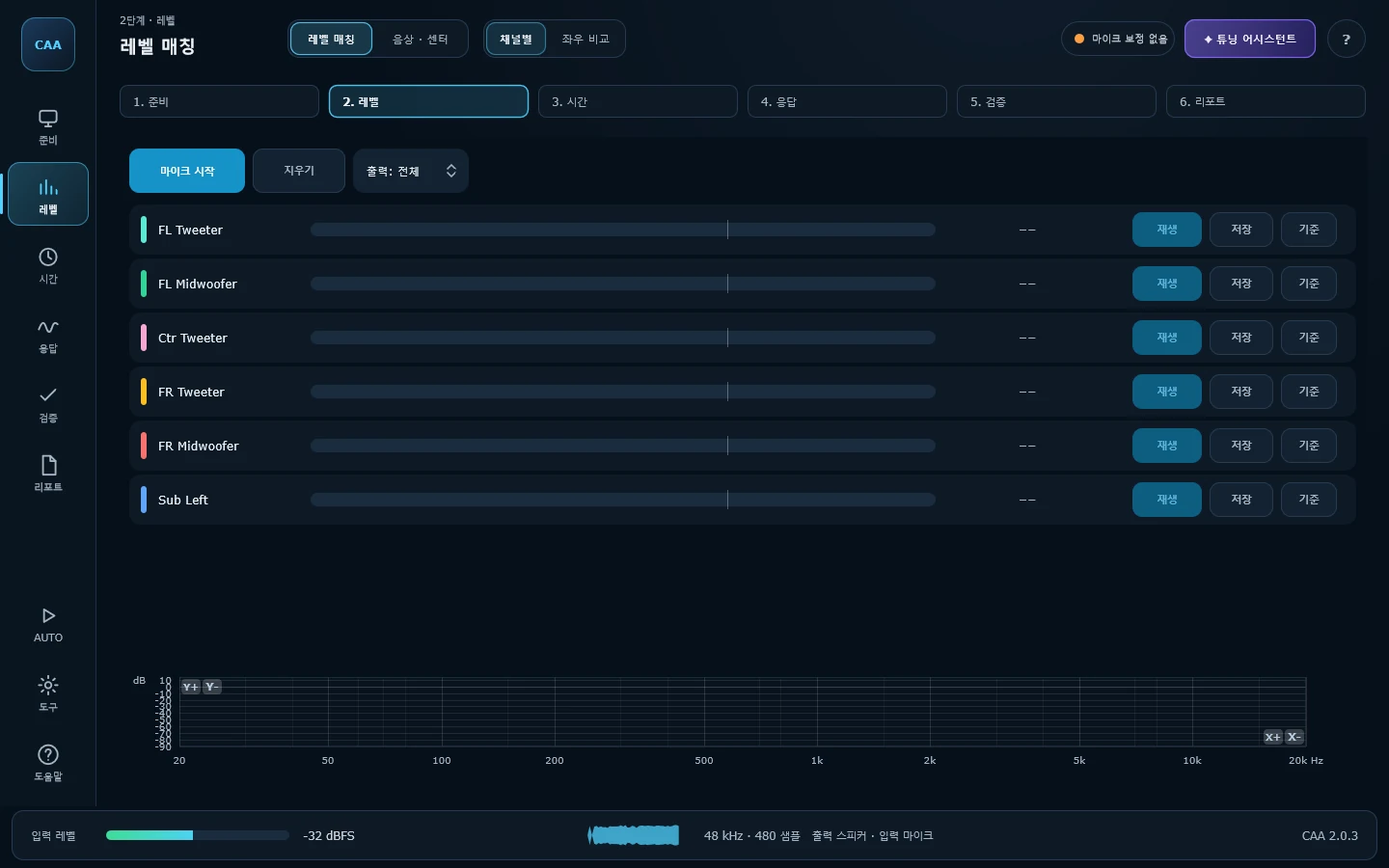
스피커별 도달 시간을 재고 DSP 지연값을 계산합니다Arrival time per speaker, and the delay to dial in
- 스윕 한 번으로 채널별 도달 시간과 극성One sweep gives each channel's arrival and polarity
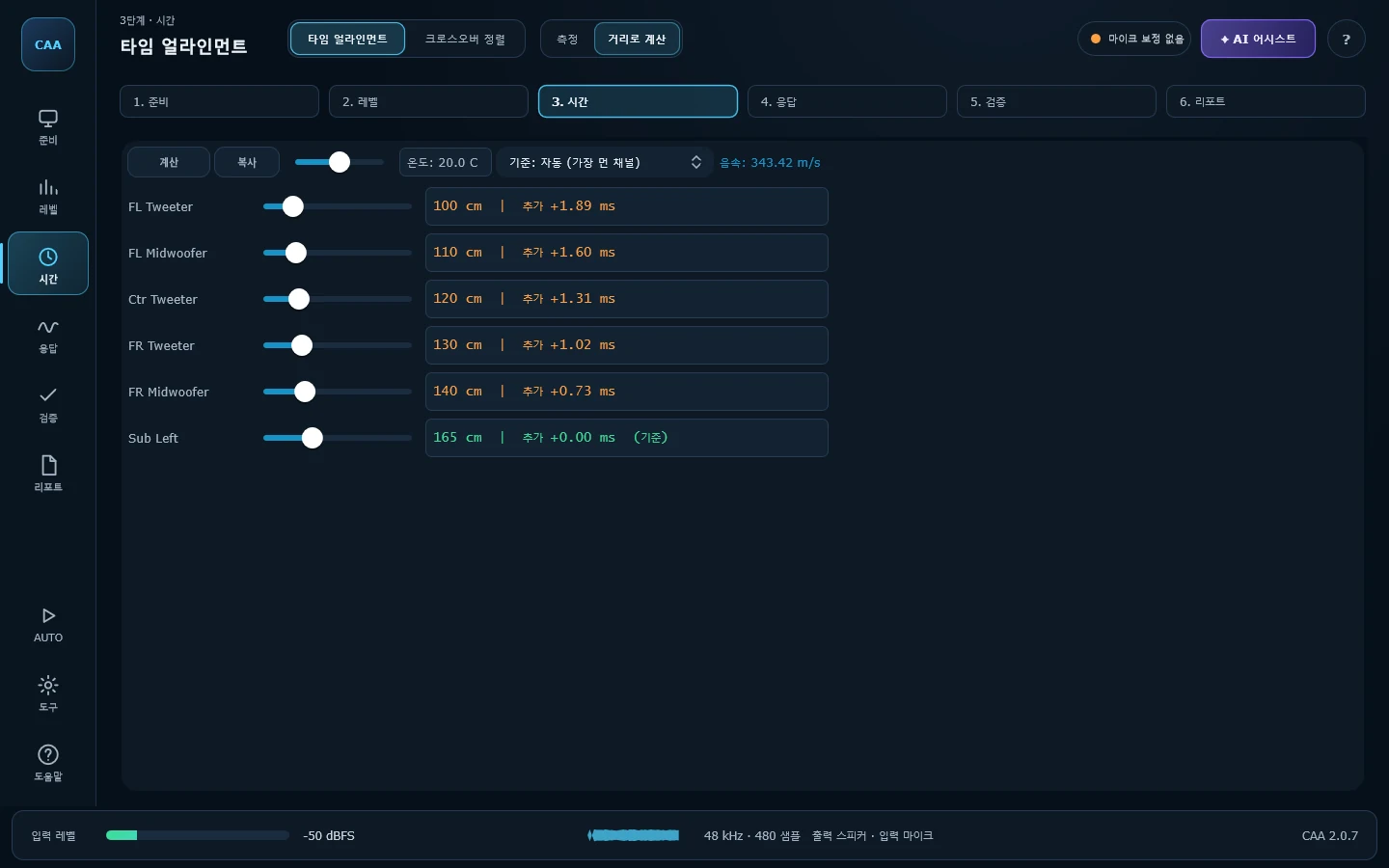
- 가장 먼 유닛 기준으로 나머지에 넣을 지연(+ms)을 바로 표시The delay to add to every driver but the farthest, in +ms
- 줄자로 잰 거리로도 계산, 크로스오버 합산 정렬까지Or work it out from tape-measured distances; then align the crossover sum
화면: 타임 얼라인먼트 / 거리로 계산 / 크로스오버 정렬Stage 3 of 6 · Time
사용설명서에서 보기 →Read it in the manual →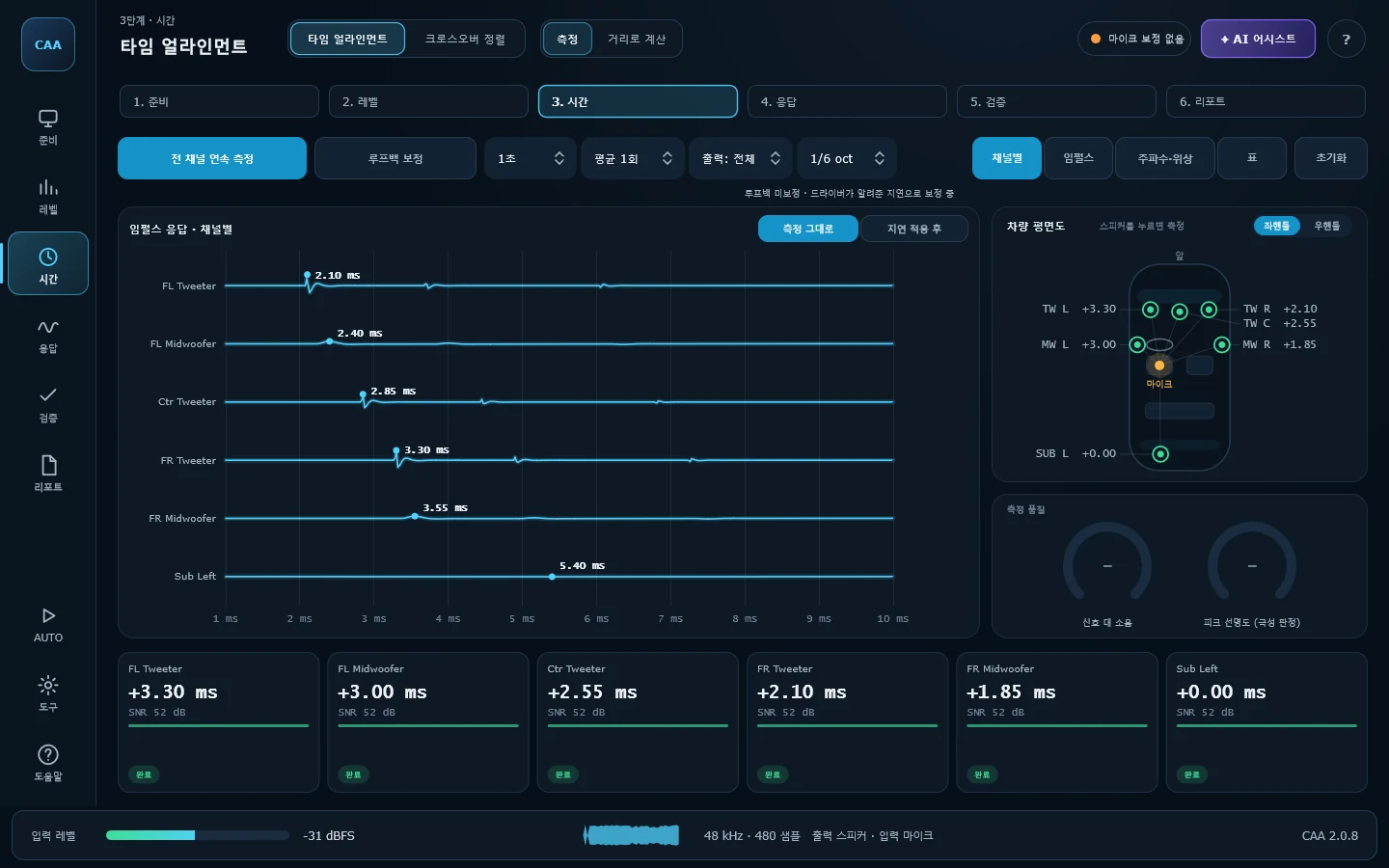
주파수 응답을 보고 31밴드로 보정합니다See the response, correct it with 31 bands
- RTA는 1/3~1/24 옥타브, 배경 소음은 NC 곡선과 비교RTA from 1/3 to 1/24 octave; noise against the NC curves
- EQ 자동 추천은 라이브 EQ의 필터 그대로 계산EQ advice computed with Live EQ's own filters
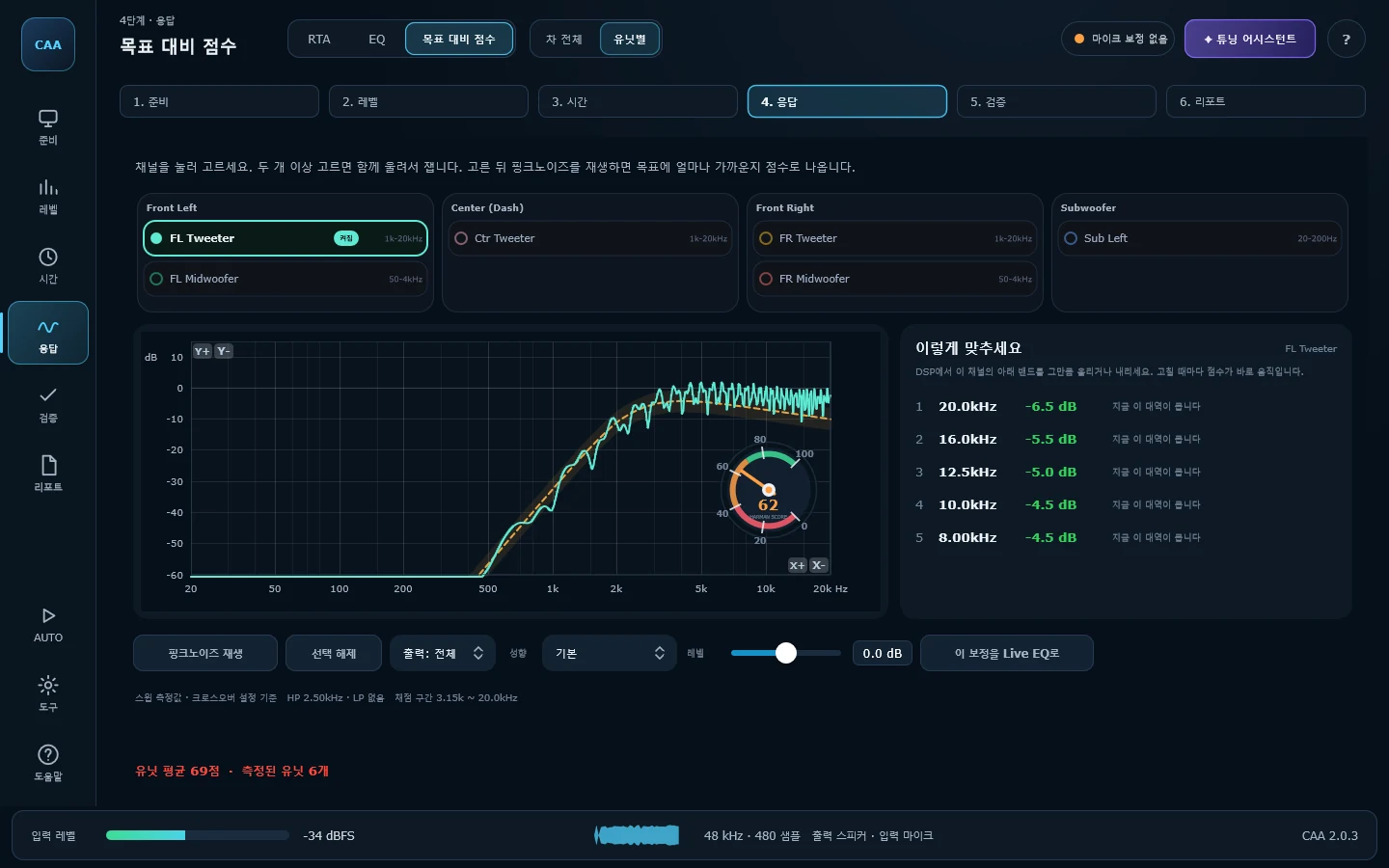
- 보정하면서 목표 대비 점수가 그 자리에서 움직임The score against target moves as you correct
화면: RTA / 핑크노이즈 / 스펙트로그램 / EQ 추천 / 실시간 보정 / 목표 대비 점수Stage 4 of 6 · Response
사용설명서에서 보기 →Read it in the manual →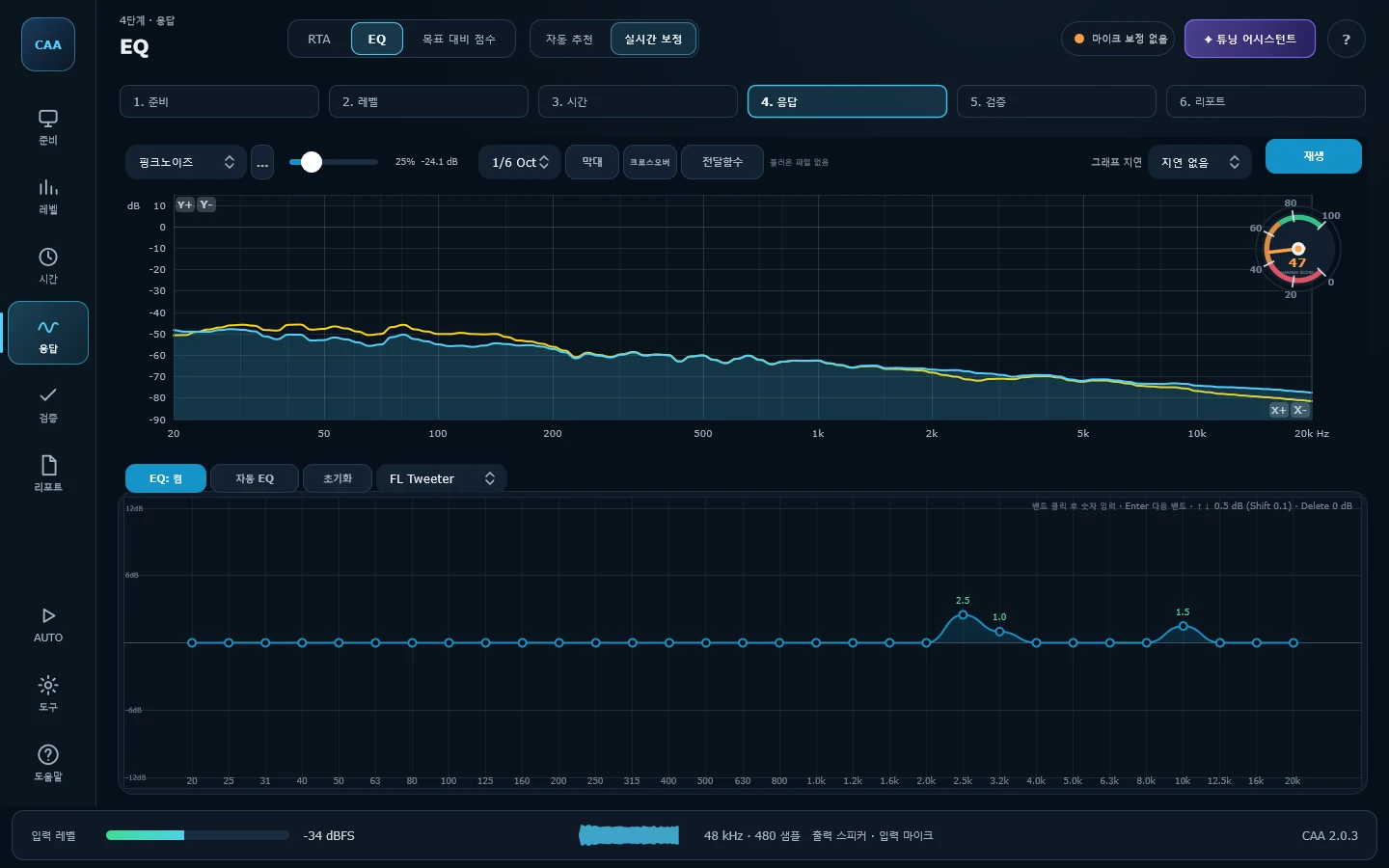
고친 것이 실제로 나아졌는지 확인합니다Check the fix actually helped
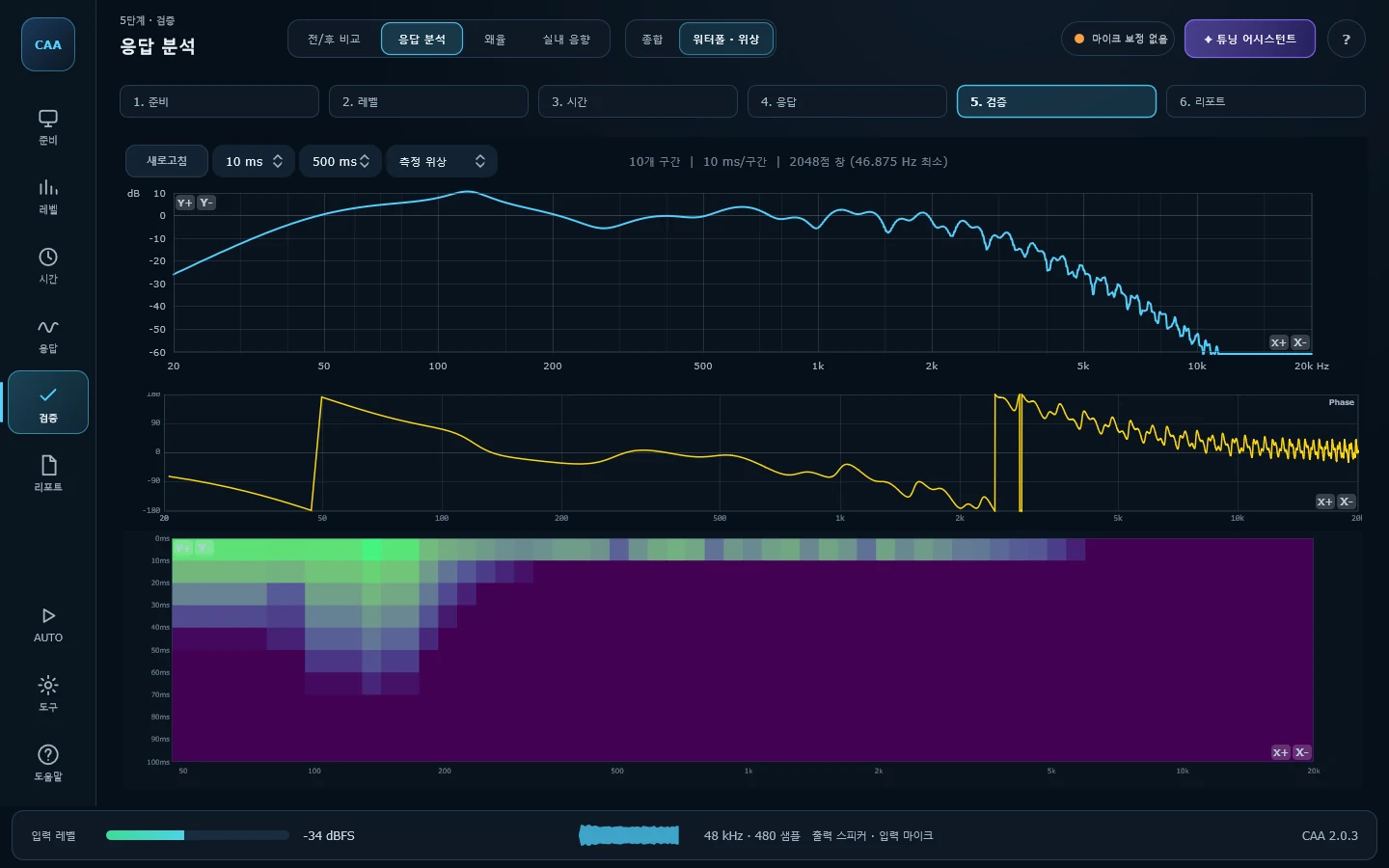
- 보정 전/후 응답을 겹쳐 보고 목표 오차가 몇 dB 줄었는지 확인Before and after overlaid, with the error against target in dB
- 워터폴로 공진과 감쇠, 스윕 한 번으로 전 대역 왜율Waterfall for resonance and decay; distortion across the band from one sweep
- 잔향 시간·명료도 등 ISO 3382-1 실내 음향 지표Reverberation, clarity and the other ISO 3382-1 cabin metrics
화면: 전/후 비교 / 응답 분석 / 왜율 / 실내 음향Stage 5 of 6 · Verify
사용설명서에서 보기 →Read it in the manual →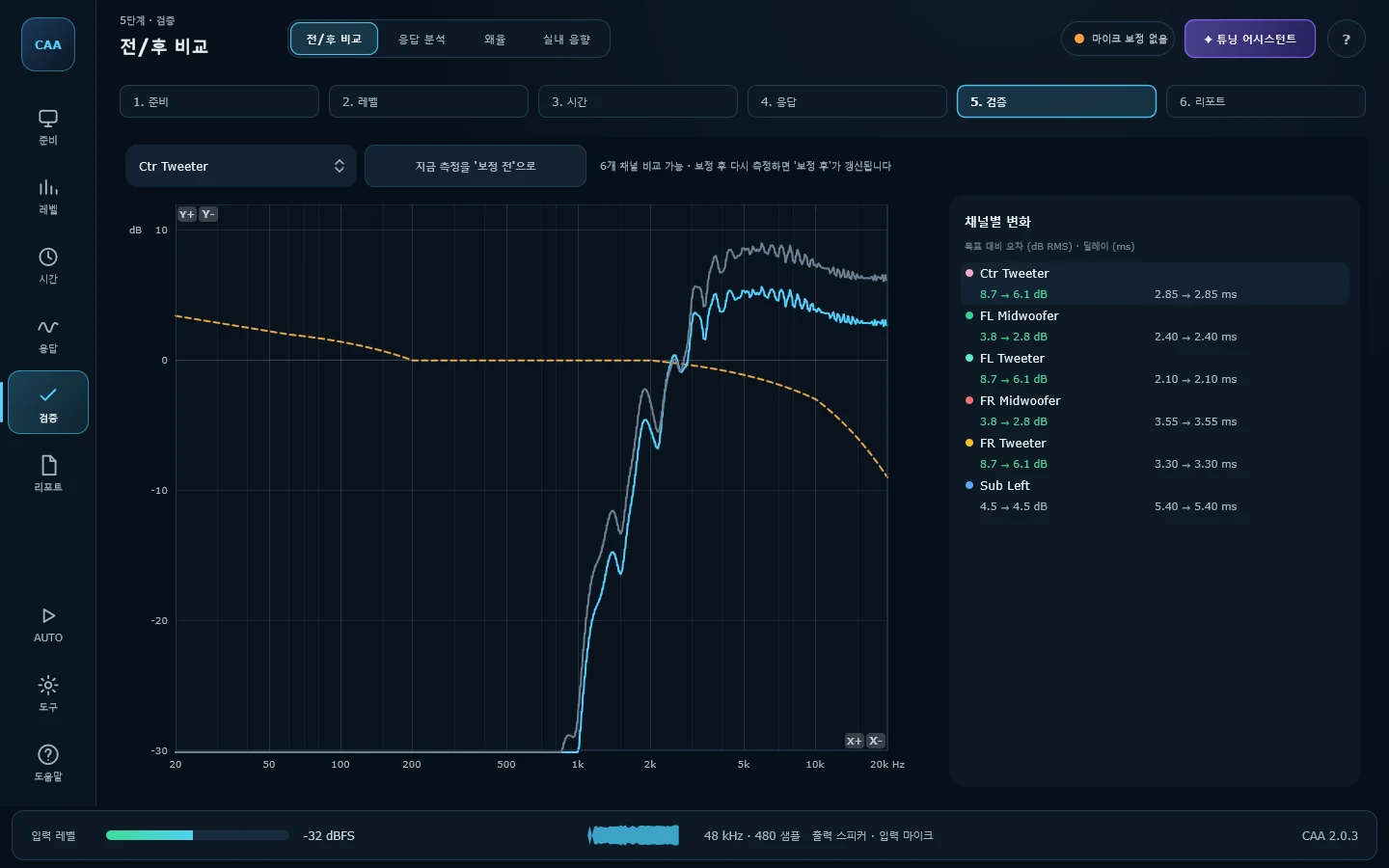
작업을 파일 하나와 리포트로 남깁니다Keep the job as one file and a report
- 측정·보정·크로스오버를 .caa 파일 하나에 저장Measurements, corrections and crossover in one .caa file
- 벡터 PDF 리포트(확대해도 선명, 한글 깨짐 없음)와 DSP 입력 시트Vector PDF report and a DSP entry sheet
- CSV로 내보내 스프레드시트에서 다시 쓰기CSV export for a spreadsheet
화면: 저장 · 리포트Stage 6 of 6 · Report
사용설명서에서 보기 →Read it in the manual →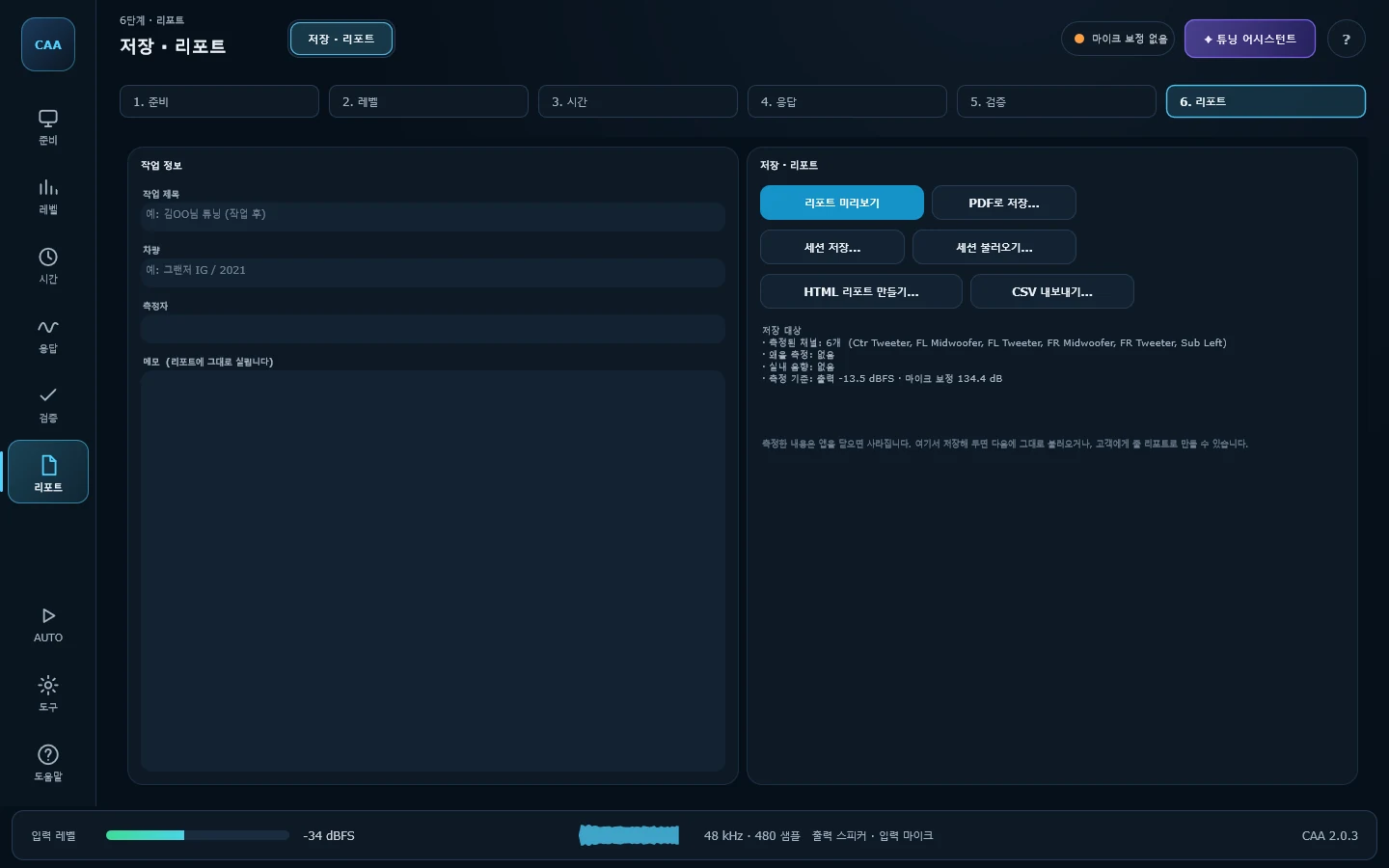
스피커별 도달 시간을 ms 단위로Per-speaker arrival time, in milliseconds
운전석에서 좌우 도어까지의 거리는 보통 40 cm 넘게 차이 납니다. 소리로 치면 1 ms가 넘고, 크로스오버 부근에서는 그것만으로 딥이 생깁니다. 채널마다 스윕을 한 번씩 재면 도달 시간이 밀리초로 나옵니다. 가장 먼 유닛을 기준으로 나머지에 넣을 지연값까지 계산해 주니, 그 숫자를 DSP에 그대로 옮기면 됩니다.From the driver's seat the two front doors are usually more than 40 cm apart — over a millisecond of sound, and enough on its own to put a hole at the crossover. Sweep each channel once and you get its arrival time in milliseconds, plus the delay to add to every driver that is not the farthest. Those numbers go straight into the DSP.
- 루프백 캘리브레이션으로 사운드카드 왕복 지연 제거Loopback calibration removes the interface's round-trip latency
- 48 kHz에서 한 샘플은 0.02 ms입니다. 피크를 샘플 사이까지 보간해 그보다 미세하게 잡습니다One sample at 48 kHz is 0.02 ms; the peak is interpolated between samples to land finer than that
- 임펄스와 응답, 위상을 한 화면에서 같이 봅니다 — 극성이 뒤집힌 채널은 첫 봉우리가 아래로 꺾여 바로 보입니다Impulse, magnitude and phase together on one screen — a channel wired backwards shows it in the first peak, pointing down
- 출력 채널을 지정해 한 스피커만 격리 측정Target one physical output to isolate a single driver
실시간 스펙트럼과 소음 기준Live spectrum and noise criteria
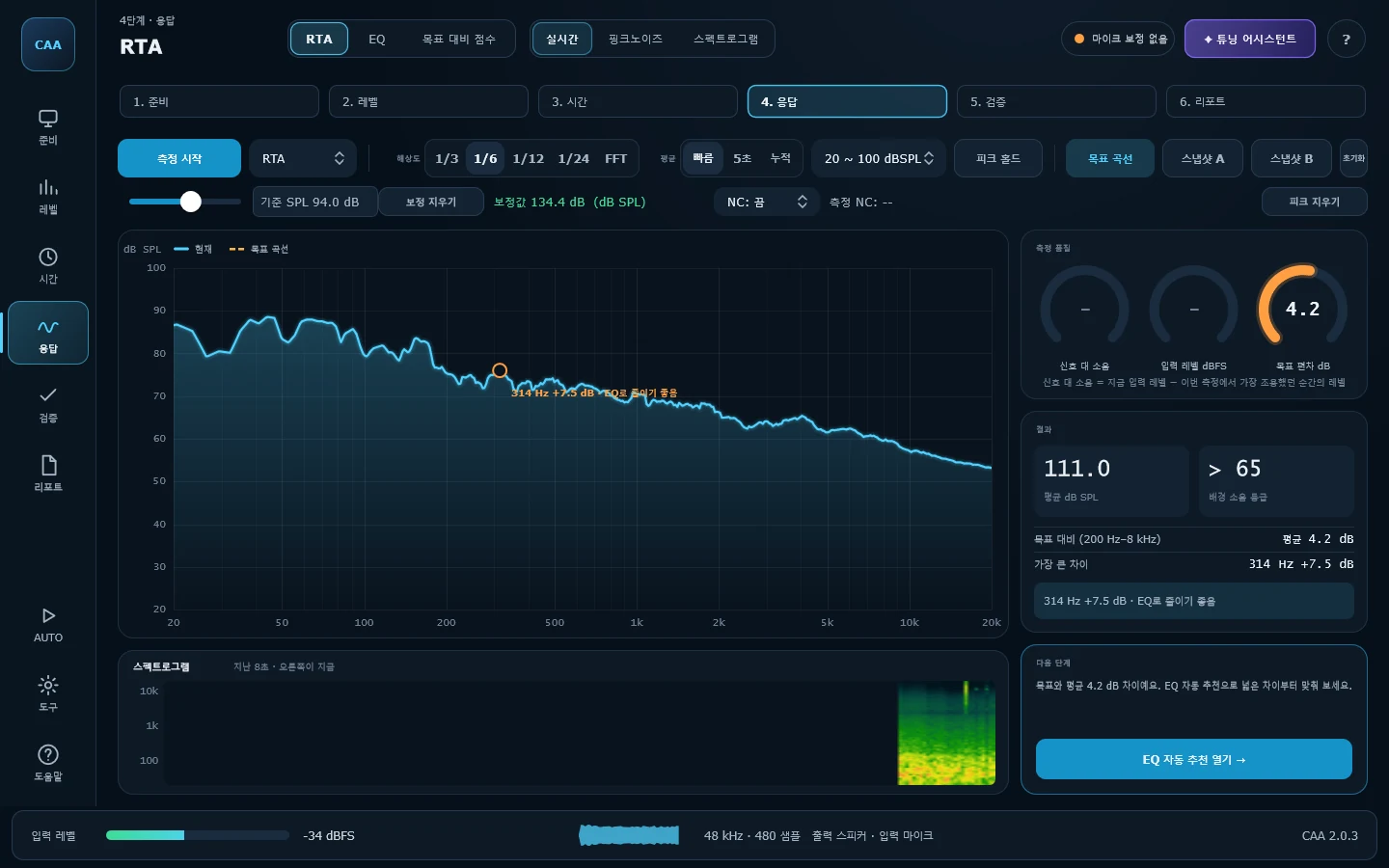
차 안은 좁아서 반사가 촘촘합니다. 1/24 옥타브로 보면 톱니처럼 보이고 1/3로 보면 뭉개져서, 실제로 손댈 것이 보이는 건 대개 1/6 근처입니다. 좁고 깊은 딥은 반사가 만든 상쇄라 EQ로 올려도 그 자리는 안 채워집니다. 넓고 완만한 것만 건드리세요.A car is a small space and the reflections are dense. At 1/24 octave you are looking at a saw blade; at 1/3 everything is smoothed into agreement. What you can actually act on usually shows around 1/6. A narrow deep notch is cancellation, not a shortfall — boost it and you get distortion, not level. Work on the broad, gentle stuff.
- 배경 소음을 NC 곡선에 겹쳐 봅니다. 40 dB 아래면 좋은 조건, 60 dB를 넘으면 그날 측정은 믿기 어렵습니다Background noise against the NC curves: under 40 dB is a good day, over 60 dB and the numbers are not worth keeping
- H1 전달함수 모드 — 위상과 코히런스 동시 표시H1 transfer-function mode showing phase and coherence
- 1초 ~ 60초 또는 연속 시간 평균Timed averaging from 1 to 60 seconds, or continuous
들으면서 바로 보정Tune by ear and by eye at once
밴드를 하나 움직이면 마이크로 들어오는 응답이 그 자리에서 따라 움직입니다. 계기판 점수도 같이 움직이니, 지금 손댄 것이 나아진 것인지 아닌지를 그 순간에 압니다. 부스트는 +3 dB 안에서 끝내세요. 그보다 많이 올려야 한다면 EQ가 아니라 유닛 위치나 크로스오버를 다시 볼 문제입니다.Move a band and the microphone's response moves with it, right there. So does the score on the dial, so you know whether what you just did helped before you move on. Keep boosts inside +3 dB — if you need more than that, the answer is the driver's position or the crossover, not the equaliser.
- 채널별 보정값 저장 · 전환Per-channel corrections, stored and switchable
- 크로스오버 설계 곡선 오버레이Crossover design curve overlay
- 핑크노이즈 또는 직접 준비한 음원으로 재생Play pink noise or your own audio file
더 많은 화면More screens
측정부터 보정, 검증까지 필요한 도구를 모두 넣었습니다.Everything from measurement through correction to verification.
전 대역 왜율 측정Distortion across the band
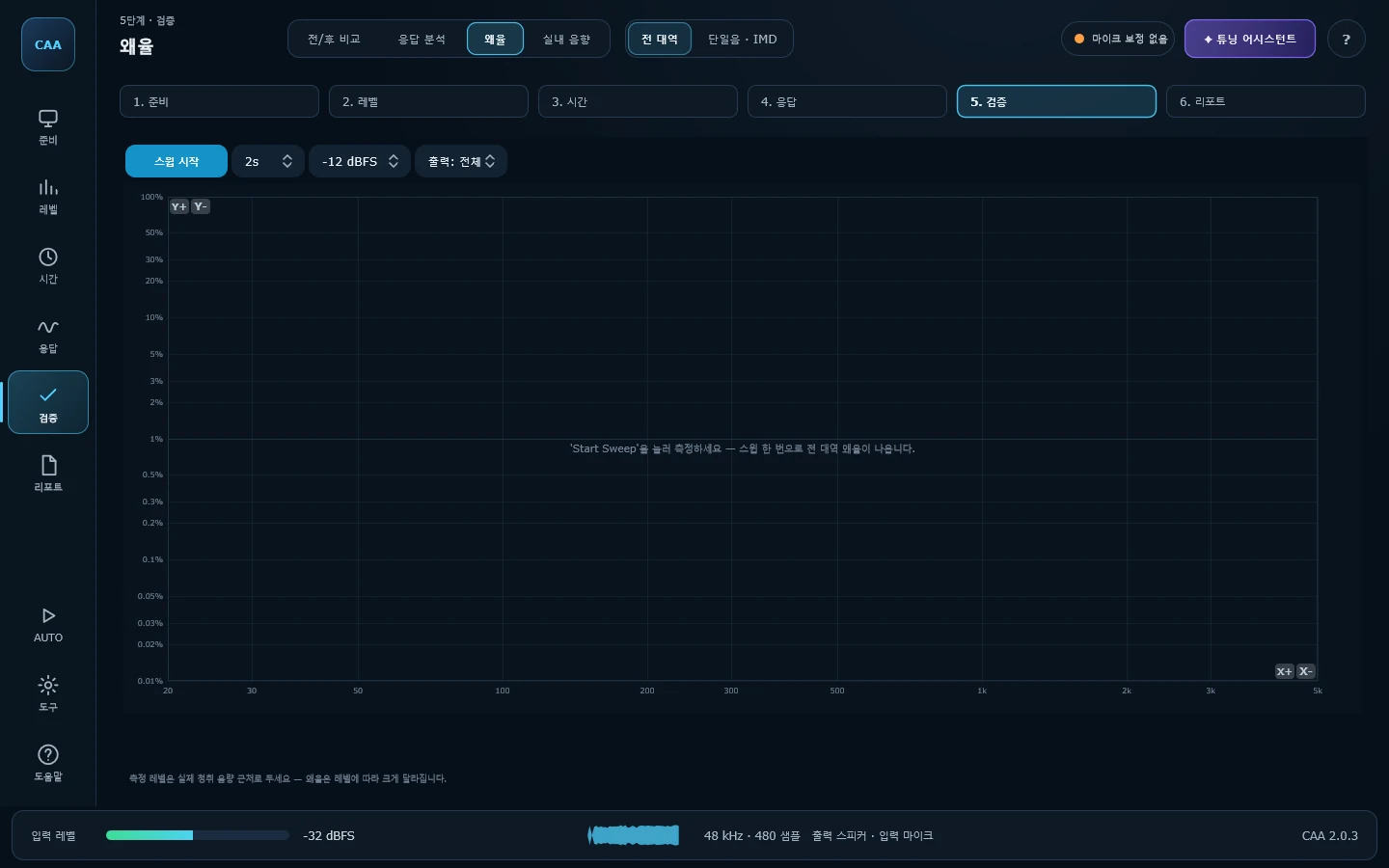
스윕 한 번으로 전 대역 왜율을 곡선으로 보여줍니다. 도어 트림 떨림이나 유닛 바닥침은 특정 주파수에서만 나타나서, 1 kHz 한 점만 재는 방식으로는 절대 잡히지 않습니다.One sweep, distortion across the whole band. A buzzing door card or a driver bottoming out only shows at particular frequencies — a single 1 kHz tone will never find it.
- 2~5차 고조파(THD)와 6~10차 고차 왜율(Rub & Buzz)을 분리 표시Harmonics two to five (THD) separated from orders six to ten (rub & buzz)
- 별도 테스트 신호 없이 스윕 하나로 측정 — 타임 얼라인먼트와 같은 방식No extra test signal: it reads what a normal sweep already contains
- 이번 측정의 노이즈 플로어를 함께 표시해 측정 한계를 구분The run's own noise floor is drawn, so the limit of the measurement is visible
측정 저장과 리포트Saving and reporting
작업 전에 한 번, 작업 후에 한 번 저장하면 무엇이 얼마나 좋아졌는지 숫자로 남습니다. 그때의 측정 기준까지 함께 저장되므로 다른 날 잰 결과와도 비교할 수 있습니다.Save once before you start and once when you finish, and the improvement is on record. The reference levels are stored with it, which is what makes two different days comparable at all.
- AUTO 모드가 19단계 순서를 안내하고 DSP에 넣을 값을 계산AUTO mode walks the 19 steps and works out the values to enter in the DSP
- 6분 52초 음성 안내 영상으로 전체 과정 보기 — 화면별로 나눠 본 것은 라이브러리에A narrated seven-minute walkthrough, plus a clip per menu
- 측정 엔진 검증 241항목 — 항목별 측정값과 허용 오차를 그대로 공개합니다The engine is checked against 241 signals with known answers, and every result is published
- 전달함수 모드에서는 손님 음악을 틀어둔 채로도 응답·위상·코히런스가 나옵니다. 핑크노이즈를 오래 틀어두기 곤란한 자리에서 씁니다In transfer-function mode the response, phase and coherence come out of whatever is playing — useful where you cannot leave pink noise running
- 채널별 임펄스 · 응답 · 위상 · 지연 · 극성을 파일 하나(.caa)로Impulse, response, phase, delay and polarity per channel in one .caa file
- 표와 그래프가 들어간 PDF 리포트 — 미리보기로 확인하고 바로 저장A PDF report with tables and charts — check it in the preview, save it straight out
- UMIK-1처럼 개별 보정 파일이 딸려 오는 마이크라면 그 파일을 불러오세요. 마이크 자체의 편차가 측정에서 빠집니다If your mic came with its own calibration file — a UMIK-1, say — load it, and the microphone's own deviation comes out of the measurement
사용 대상Who it's for
귀로 들은 것을 숫자로 확인해야 하는 자리에 있는 분들.For anyone who has to back up what they heard with a number.
카오디오 시공·튜닝Installers and tuners
지연과 게인을 감이 아니라 측정으로 정합니다. 작업 전후를 저장해 두면 "좋아졌다"를 말이 아니라 그래프로 보여드릴 수 있고, 몇 달 뒤 손님이 다시 왔을 때 그때 무엇을 어떻게 해뒀는지 파일 하나로 되살아납니다.Delays and gains come from a measurement, not a feel for it. Save before and after and "it is better now" becomes a graph — and when the customer comes back in six months, one file tells you exactly what you did.
직접 튜닝하는 오너Owners tuning their own car
처음이라면 AUTO 모드를 켜세요. 19단계를 순서대로 안내하고, 순서를 어기면 앞 단계가 무효가 되는 지점에서는 다음으로 넘기지 않습니다. 각 화면의 ? 버튼에는 그 화면의 측정법이 들어 있습니다.If this is your first time, turn on AUTO mode. It walks the nineteen steps in order and refuses to move on where going out of order would quietly invalidate what you already did. Every screen's ? button explains how to measure with it.
홈오디오·소규모 공간Home audio and small rooms
차량 전용 기능을 빼고 봐도 RTA, 임펄스 응답, 룸 어쿠스틱, THD 측정은 일반적인 청취 공간에도 그대로 쓸 수 있습니다.Set the car-specific parts aside and the RTA, impulse response, room acoustics and distortion tools work just as well in an ordinary listening room.
최근 릴리즈Latest release
2.0.11 · 2026-10-30 ·CAA 2.0.11 — 채널 순서대로 측정CAA 2.0.11 — guided channel-by-channel run
- 채널 순서대로 측정 — 타임 얼라인먼트의 "전 채널 연속 측정"을 "채널 순서대로 측정"으로 바꿨습니다. 채널마다 멈추고 "채널 2 / 6 — DSP에서 FL Tweeter만 소리 나게 한 뒤"처럼 할 일을 알려 주며, 버튼도 다음 채널 이름으로 바뀝니다. 끝나면 DSP에 넣을 지연값 표가 나옵니다.Guided channel-by-channel run — Time Alignment's run button is now a guided sequence: it stops at each channel, says which channel to solo in the DSP ("channel 2 / 6"), and the button names the next channel. The DSP delay table appears at the end.
검증 241항목을 전부 통과한 빌드입니다 —검증 결과This build passes all 241 verification checks —the results
무료로 써보세요Use it free
설치하면 모든 기능을 제한 없이 쓸 수 있습니다. 시리얼 번호도, 평가 기간도 없습니다.Install it and every feature is open. No serial, no trial limit.